
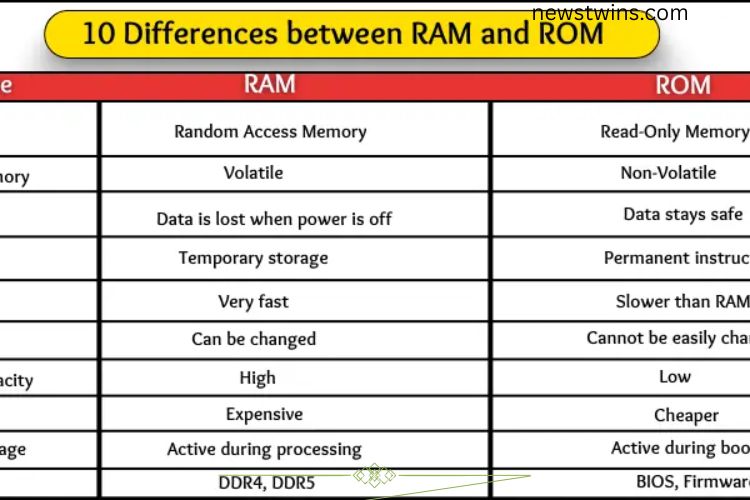
Confused between RAM and ROM in your computer class or exams? You’re not alone. Many beginners struggle to remember how these two types of memory differ. This guide breaks down the 10 essential differences between RAM and ROM, making it simple to understand.
Read More: Discover the Ultimate Guide to Keyboard Types: Unlock Comfort, Speed, and Precision!
Full Form
RAM (Random Access Memory) allows the computer to access any part of it quickly. It temporarily stores data while programs are running, enabling your computer to process tasks faster.
ROM (Read-Only Memory) stores permanent data and instructions that cannot be easily changed. It helps the computer boot and execute essential tasks even when powered off.


Type of Memory
RAM is volatile memory, meaning it only works while the computer is on. It holds data for active apps and tasks but loses everything once the system shuts down.
ROM is non-volatile, keeping its data even when the computer is off. It contains essential startup instructions that never change.
Data Loss
RAM acts like the computer’s short-term memory. Power off your system, and all data in RAM disappears, requiring reloading programs and apps.
ROM retains its data permanently. Even without power, it safely stores crucial instructions, ensuring the computer can start reliably.
Use
RAM stores temporary data needed during computer use. It speeds up tasks like running games, software, or multitasking efficiently.
ROM provides basic, permanent instructions for startup. It ensures the computer knows what to do every time it powers on.
Speed
RAM is high-speed memory, critical for fast program execution and multitasking. The more RAM, the smoother and quicker your system performs.
ROM operates slower since its main task is secure storage of permanent instructions. Speed is less critical here, as the data rarely changes.
Editable
RAM is fully editable, allowing programs to read and write data as needed. However, all changes vanish when the system shuts down.
ROM is not editable. Its data is permanent, ensuring the system always has reliable instructions to start up and function correctly.
Storage Capacity
RAM typically offers larger storage than ROM to handle temporary, high-volume data like running apps and games. Modern computers can have several gigabytes of RAM.
ROM requires minimal space since it only stores essential instructions. Its storage capacity is smaller compared to RAM.
Cost
RAM is more expensive because it is fast and stores larger amounts of temporary data. High-speed RAM costs increase with performance.
ROM is cheaper, slower, and holds less data. Its manufacturing is less complex, making it more affordable.
Working Stage
RAM works actively when the computer is running. It supports multitasking, gaming, and software usage but stops functioning when the system powers off.
ROM is always present, storing startup instructions that the computer reads every time it turns on. Its data remains intact, powering essential operations.
Examples
RAM Examples: DDR4, DDR5 memory in PCs, laptops, and smartphones. These enable fast loading of games, applications, and multitasking.
ROM Examples: BIOS, firmware in computers, and embedded memory in devices like microwaves and printers. These ensure devices start and function correctly, even without power.
Frequently Asked Questions:
What is the main difference between RAM and ROM?
RAM is temporary, high-speed memory used for active tasks, while ROM is permanent memory that stores essential instructions for startup and system operations.
Can RAM data be retained after turning off the computer?
No, RAM is volatile memory. All data in RAM is lost once the computer powers off.
Is ROM editable like RAM?
Standard ROM is not editable, ensuring important instructions remain unchanged. However, some types like EEPROM or Flash ROM allow limited updates.
Which one affects computer speed more, RAM or ROM?
RAM directly affects computer speed since it handles running applications and multitasking. ROM has minimal impact on speed as it only stores startup instructions.
Can I upgrade ROM like RAM?
No, ROM is usually fixed and cannot be upgraded. RAM can often be increased to enhance system performance.
Where is RAM used in devices?
RAM is found in computers, laptops, and smartphones to manage temporary data for apps, games, and multitasking.
Where is ROM used in devices?
ROM stores BIOS, firmware, and essential instructions in computers, printers, microwaves, and other electronics to ensure proper functioning even without power.
Conclusion
Understanding the differences between RAM and ROM is essential for anyone using or learning about computers. RAM provides fast, temporary storage that powers multitasking and smooth performance, while ROM ensures permanent storage of critical instructions that keep your system running reliably. Both types of memory work together to make your computer efficient, responsive, and dependable. By knowing how RAM and ROM function, you can make informed decisions about upgrades, troubleshoot issues effectively, and optimize your device for better performance. Mastering these differences truly unlocks the full potential of your computer.