
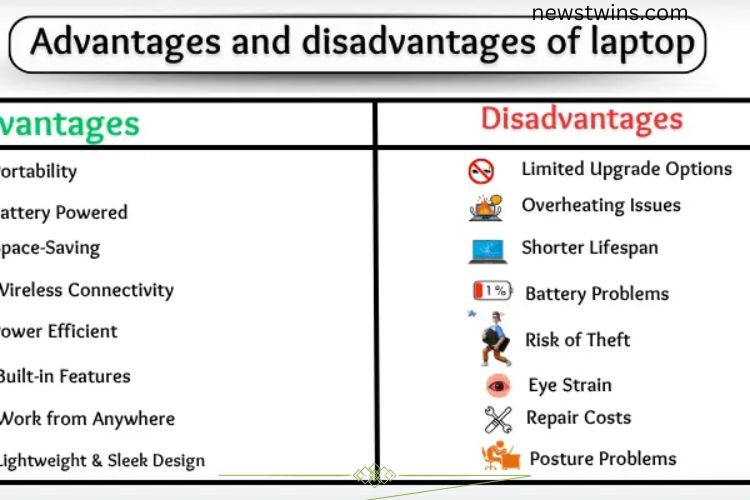
Laptops have become essential tools for work, study, and entertainment. Their portability and convenience make them a preferred choice over desktops, but they come with both strengths and weaknesses. Understanding these advantages and disadvantages can help you choose and use laptops more effectively.
Read More: Discover the Hidden Power of Microcomputers: Unlocking Their Incredible Potential
Advantages of Laptops
Energy Efficiency
Laptops consume less power compared to desktop computers. They are designed to work efficiently on battery, which reduces electricity usage. This makes laptops not only portable but also environmentally friendly and cost-effective.
Built-in Features
One of the biggest advantages of laptops is their all-in-one design. They include a screen, keyboard, trackpad, camera, and speakers built into a single device. This eliminates the need for extra peripherals and makes the laptop ready to use anywhere.



Work from Anywhere
Laptops allow users to work or study from virtually any location. Whether at home, school, a park, or while traveling, you can carry your laptop and continue your tasks without being tied to a desk. This mobility provides freedom and flexibility that desktop computers cannot match.
Ideal for Students
Students benefit greatly from laptops. They can access online resources, complete assignments, join virtual classes, and watch educational videos. A laptop can easily be carried to school or used at home, simplifying learning and making it more engaging.
Lightweight and Sleek Design
Modern laptops are thin, lightweight, and stylish. They fit easily in a backpack or handbag, making them convenient for commuting and travel. Their sleek design also gives them a modern, professional appearance, which adds to their appeal.
Online Communication
Laptops make communication effortless. With a built-in camera and microphone, users can participate in video calls, attend online meetings, and stay connected with family and friends. This feature is especially important in today’s remote work and learning environments.
Versatile Functionality
Laptops support a wide range of activities, from basic word processing and internet browsing to complex software applications and creative projects. Their portability allows users to switch between tasks easily, making them versatile tools for personal and professional use.
Disadvantages of Laptops
While laptops offer many benefits, they also have limitations that users should consider.
Limited Upgrade Options
Most laptops come with fixed internal components, making upgrades difficult. Unlike desktops, you cannot easily replace the processor, graphics card, or storage. This limits the laptop’s lifespan and future performance improvements.
Overheating Issues
Extended use can cause laptops to overheat. Prolonged exposure to heat can slow performance and even damage internal components. Overheating also makes long work sessions uncomfortable.
Shorter Lifespan
Laptops generally have a shorter lifespan than desktops. After a few years, performance may decline, batteries weaken, and hardware may fail. Regular use and mobility can accelerate wear and tear, requiring replacement sooner than a desktop.
Battery Problems
Laptop batteries can degrade over time or malfunction. A weak battery may run out quickly, fail to hold a charge, or stop charging altogether. This can disrupt work, especially when access to power is limited.
Risk of Theft
Laptops are portable, which makes them easy targets for theft. Losing a laptop can result in data loss and potential security breaches. Always secure your device and use protective measures when traveling or working in public spaces.
Eye Strain
Prolonged screen time can lead to eye discomfort, dryness, and headaches. This is common when working on laptops for long periods without breaks. Adjusting screen brightness, using anti-glare screens, and taking regular breaks can help reduce eye strain.
High Repair Costs
Repairing a laptop can be expensive. Components are often compact and complex, requiring professional assistance. Some parts may be costly or difficult to replace, making maintenance a potential challenge.
Performance Limitations
Laptops are less powerful than high-end desktops. Running heavy software or advanced games can cause slowdowns or freezing. This makes laptops less suitable for resource-intensive tasks, although they are perfect for everyday computing needs.
Typing Discomfort
Laptop keyboards are smaller than traditional keyboards, which can cause discomfort during extended typing sessions. Users may experience finger fatigue or strain, especially when working on lengthy documents or assignments.
Posture Problems
Using a laptop for long hours without proper ergonomics can lead to back, neck, and shoulder pain. Low screen height and compact design may force users into awkward positions, contributing to long-term posture issues.
Choosing the Right Laptop
When selecting a laptop, it is important to balance your needs with its limitations. Consider the following factors:
- Usage Purpose: For students and professionals performing light tasks, a standard laptop is sufficient. For gaming, video editing, or software development, prioritize high-performance models.
- Portability: If you travel frequently, choose a lightweight and slim laptop with long battery life.
- Upgrade Options: Some laptops allow RAM or storage upgrades. Check if future improvements are possible.
- Budget: Balance your budget with required features. Higher-end laptops offer better performance but come at a higher cost.
- Durability: Look for sturdy designs, quality materials, and good cooling systems to ensure a longer lifespan.
Tips for Using a Laptop Efficiently
Maximizing laptop performance and longevity requires mindful usage. Here are some tips:
- Take Breaks: Reduce eye strain and physical discomfort by following the 20-20-20 rule—look away from the screen every 20 minutes for 20 seconds.
- Use Cooling Pads: Prevent overheating during long sessions by using cooling pads or keeping the laptop on flat, hard surfaces.
- Protect the Battery: Avoid letting the battery fully discharge frequently. Charge between 20% and 80% for optimal health.
- Secure Your Device: Use strong passwords, enable tracking software, and avoid leaving your laptop unattended in public.
- Optimize Performance: Regularly clean up storage, uninstall unused software, and update the system to maintain smooth performance.
Frequently Asked Questions:
What are the main advantages of using a laptop?
Laptops offer portability, energy efficiency, and convenience. They allow users to work or study from anywhere, include built-in features like a camera and keyboard, and support online communication. Their lightweight and sleek design also makes them easy to carry.
Are laptops suitable for students?
Yes, laptops are ideal for students. They provide access to online classes, e-books, educational videos, and productivity tools. Their portability allows students to study at home, school, or on the go.
What are common problems with laptops?
Common issues include overheating, battery degradation, limited upgrade options, and performance limitations with heavy software. Extended use can also cause eye strain, typing discomfort, and posture problems.
Can laptops be upgraded like desktops?
Most laptops have limited upgrade options. While some models allow RAM or storage upgrades, components like the processor or graphics card are usually fixed, making performance improvements challenging.
How can I prevent my laptop from overheating?
To prevent overheating, use your laptop on flat surfaces, keep vents clear, and consider using a cooling pad. Avoid prolonged use without breaks, and ensure internal fans are clean and functional.
Do laptops have a long lifespan?
Laptops generally have a shorter lifespan than desktops, typically 3–5 years depending on usage. Regular maintenance, proper handling, and battery care can extend their usability.
How can I protect my laptop from theft?
Always keep your laptop with you in public spaces, use strong passwords, enable tracking software, and store it securely when not in use. Carrying a laptop bag with anti-theft features also helps.
Conclusion
Laptops have revolutionized the way we work, study, and stay connected. Their portability, energy efficiency, and built-in features make them powerful tools for students, professionals, and casual users alike. The ability to work from anywhere, combined with sleek designs and versatile functionality, ensures laptops remain an essential part of modern life. However, laptops also come with limitations, including overheating, limited upgrade options, shorter lifespan, and potential health concerns like eye strain and posture issues. Understanding these drawbacks helps users make informed choices and use their devices safely and effectively.