
Nothing is more frustrating than a slow computer, missing files, or an unexpected virus. Luckily, utility software exists to tackle these problems efficiently. These tools optimize performance, protect your data, and ensure a smooth computing experience. By understanding the different types of utility software, you can keep your system fast, secure, and organized.
Read More: Netflix Chaos: Frustrated Users Slammed with ‘This Title Is Not Available’ Nightmare
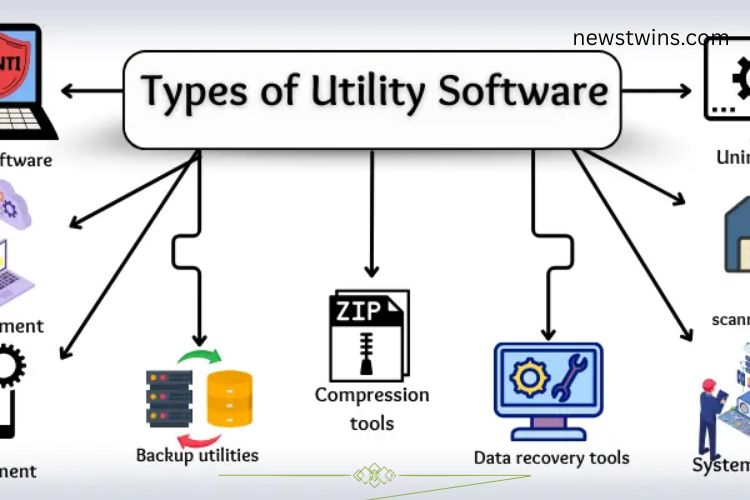
Types of Utility Software
Utility software is designed to perform specific tasks that maintain a computer’s efficiency. From security protection to system optimization, these tools ensure your device runs reliably. Understanding each type allows you to use your computer more effectively and prevent common problems.
Antivirus and Security Software
Antivirus software protects your computer from viruses, malware, and hackers. It continuously monitors your system, blocking threats and safeguarding personal data. Running in the background, these tools prevent malicious programs from harming your files or slowing down your device.


Popular Antivirus Tools:
- Windows Defender
- Avast Antivirus
- McAfee
- Norton Security
- Kaspersky
File Management Utilities
File management utilities help you organize and manipulate your files efficiently. They allow you to create, move, copy, or delete files, keeping your data neat and accessible. Without these tools, files can quickly become disorganized, making it hard to find important information.


Examples of File Management Tools:
- Windows File Explorer
- Finder (Mac)
- Total Commander
- Directory Opus
- FreeCommander
Disk Management Utilities
Disk management utilities maintain your hard drive’s health and efficiency. They help clean unnecessary files, create partitions, and optimize storage. By keeping your disk organized, these tools improve computer speed and prevent potential system issues.
Popular Disk Management Tools:
- Windows Disk Management
- Partition Magic
- EaseUS Partition Master
- AOMEI Partition Assistant
- Paragon Partition Manager
Backup Utilities
Backup utilities safeguard your important files by creating copies. In case of accidental deletion or system failure, these tools restore lost data quickly. Whether it’s school projects, work documents, or personal photos, backups provide peace of mind and protect against data loss.


Common Backup Tools:
- Google Drive
- OneDrive
- Acronis True Image
- Dropbox
- iCloud
Compression Tools
Compression tools reduce file sizes to save storage space and simplify sharing. They compress files without damaging the content, and you can restore them to their original form whenever needed. These tools are especially useful for transferring large files online.
Examples of Compression Tools:
- WinRAR
- WinZip
- 7-Zip
- PeaZip
- Bandizip
Data Recovery Tools
Data recovery tools help retrieve files lost due to deletion, corruption, or system crashes. They recover important documents, photos, and videos, reducing the stress of accidental data loss. Using these tools ensures your critical data is never permanently gone.
Popular Data Recovery Tools:
- Recuva
- Stellar Data Recovery
- EaseUS Data Recovery Wizard
- Disk Drill
- MiniTool Power Data Recovery
System Monitoring & Performance Utilities
System monitoring utilities track your computer’s performance, including CPU usage, memory, and storage. They identify issues that may slow down your system and allow you to optimize resources. Monitoring in real-time ensures your computer performs at its best.
Examples:
- Task Manager
- Resource Monitor
- HWMonitor
- Speccy
- Performance Monitor
Disk Scanning & Checking Tools
Disk scanning tools detect errors and potential issues on your hard drive. They identify problems before they escalate, keeping your files safe and your system healthy. Regular checks prevent performance slowdowns and extend your computer’s lifespan.
Popular Disk Checking Tools:
- CHKDSK (Check Disk)
- CrystalDiskInfo
- SeaTools
- HDDScan
- Disk Utility (Mac)
Uninstaller Utilities
Uninstallers remove unwanted programs completely from your computer. Leftover files from standard deletions can take up space and slow performance. Using an uninstaller keeps your system clean and running efficiently.
Examples of Uninstaller Tools:
- IObit Uninstaller
- Revo Uninstaller
- Geek Uninstaller
- Wise Program Uninstaller
- Absolute Uninstaller
Device Driver & Update Utilities
Device drivers allow your computer to communicate with hardware like printers, keyboards, and graphics cards. Update utilities ensure drivers remain current, fixing bugs and enhancing performance. Properly updated drivers make your system run smoother and more reliably.
Examples of Driver Utilities:
- Driver Booster
- DriverPack Solution
- Snappy Driver Installer
- Driver Easy
- AVG Driver Updater
Firewall Utilities
Firewalls protect your computer from online threats by monitoring incoming and outgoing data. They block suspicious activity and prevent unauthorized access to your files. Firewalls are essential for maintaining privacy and security on any network.
Popular Firewall Tools:
- Windows Firewall
- ZoneAlarm
- Comodo Firewall
- TinyWall
- GlassWire
Frequently Asked Questions:
What is utility software, and why is it important?
Utility software consists of tools that optimize, protect, and maintain your computer. It ensures fast performance, data security, and smooth system operation, making your digital life easier and more efficient.
How does utility software boost productivity?
By automating tasks like file management, backups, and system monitoring, utility software saves time, reduces errors, and allows you to focus on more important work.
Can utility software protect my personal data?
Yes. Tools like antivirus programs, firewalls, and backup utilities safeguard your files, prevent malware attacks, and help recover lost data.
What types of utility software should every computer have?
Essential utilities include antivirus/security software, file management tools, disk management, backup solutions, compression tools, data recovery tools, and system performance monitors.
How do disk and performance utilities improve my computer?
They clean unnecessary files, optimize storage, monitor system resources, and detect errors, ensuring your computer runs faster and lasts longer.
Are utility software tools easy to use for beginners?
Most modern utility software is user-friendly, with guided interfaces and automated functions, making it simple for beginners to manage and protect their systems.
Can utility software prevent computer crashes?
While it can’t eliminate all risks, utilities like disk checkers, backup tools, and antivirus programs significantly reduce the chance of system crashes and data loss.
Conclusion
Essential utility software is the backbone of a smooth, secure, and high-performing computer. From antivirus programs that guard against malware to backup tools that protect your valuable files, these utilities simplify everyday computing tasks and boost productivity. Disk management, system monitoring, and file organization tools keep your system running efficiently, while driver and firewall utilities ensure optimal performance and security.