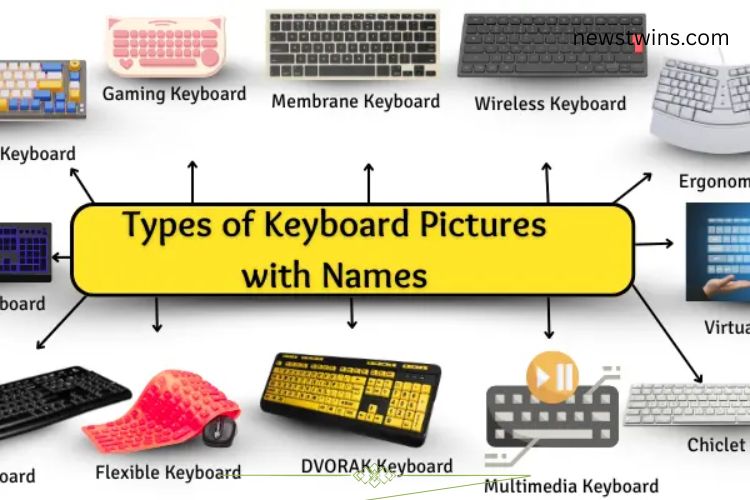
Choosing the right keyboard can be confusing with so many options available. Whether you are gaming, writing, or attending school, the type of keyboard you select can impact your comfort, speed, and overall efficiency. This guide breaks down all the main types of keyboards and helps you find the perfect one for your needs.
Read More: Essential Utility Software: Unlock the Power, Boost Productivity, and Simplify Your Digital Life
What is a Keyboard?
A keyboard is an essential device for typing on computers. Different keyboards are designed for specific purposes, such as gaming, typing, or portability. Choosing the right one depends on your daily usage, typing style, and workspace needs.
Mechanical Keyboard
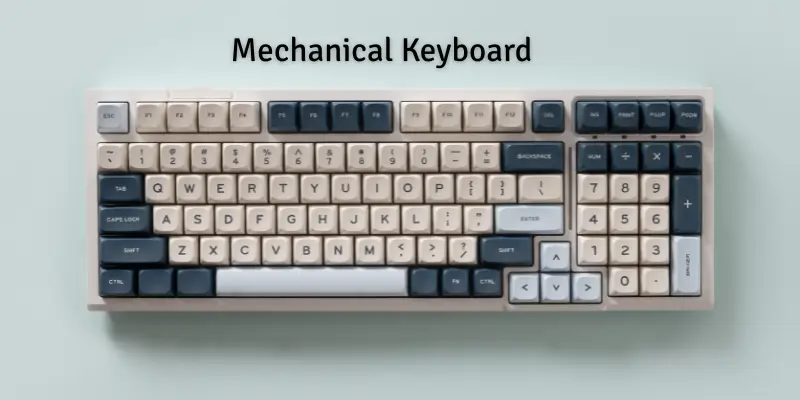
Mechanical keyboards feature individual switches under each key. When pressed, these switches provide tactile feedback, making typing satisfying and accurate. They are extremely durable and often last for millions of keystrokes.

Benefits:
- Long-lasting and robust
- Responsive for fast typing
- Excellent for gaming
Popular Mechanical Keyboards:

- Corsair K95: Features customizable lighting and durable keys, popular among gamers.
- Logitech G Pro: Compact design, perfect for quick typing and competitive gaming.
Membrane Keyboard
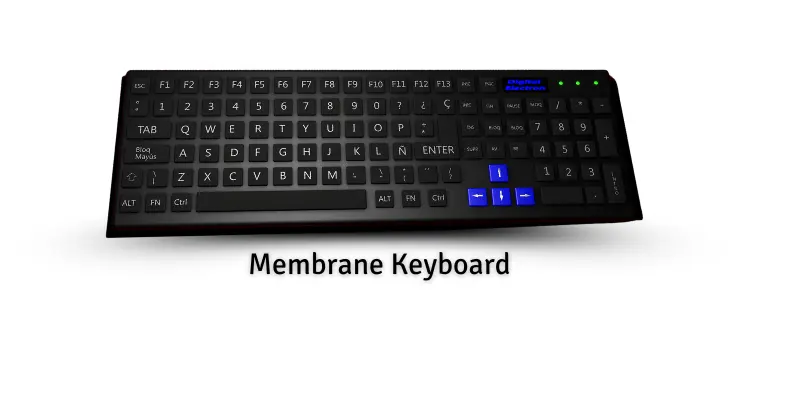
Membrane keyboards rely on a soft layer beneath the keys to register input. They are quiet, lightweight, and easy to maintain, making them ideal for office and home use.
Benefits:
- Silent typing
- Affordable
- Easy to clean
Popular Membrane Keyboards:
Dell QuietKey: Smooth and quiet, suitable for office work.

Logitech K120: Affordable and reliable, widely used in schools and homes.
Wireless Keyboard
Wireless keyboards operate via Bluetooth or USB receivers, allowing freedom of movement. They reduce desk clutter and provide convenience for multi-device setups or presentations.
Benefits:
- No cables
- Flexible placement
- Neat and organized workspace
Popular Wireless Keyboards:
- Logitech K400 Plus: Ideal for media control and casual typing.
- Microsoft Wireless Desktop 900: Reliable wireless connection with comfortable keys.
Ergonomic Keyboard
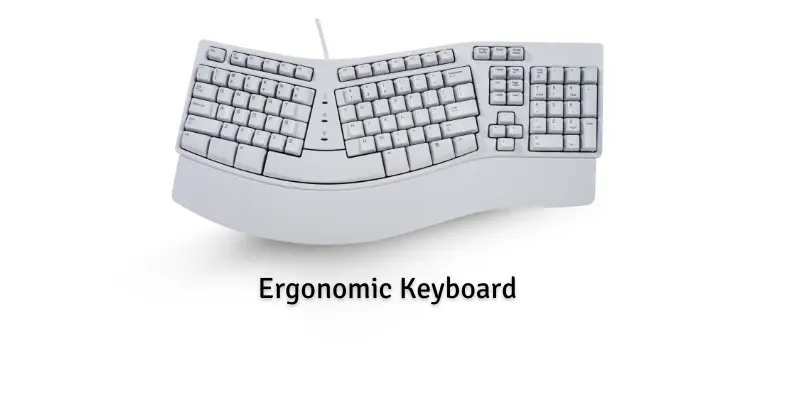
Ergonomic keyboards are designed to reduce strain on wrists and hands. They often feature curved or split layouts that promote natural hand positioning, helping prevent repetitive strain injuries.
Benefits:
- Comfortable for long typing sessions
- Reduces wrist strain
- Supports healthy hand posture
Popular Ergonomic Keyboards:
- Microsoft Sculpt Ergonomic: Curved layout supports natural hand position.
- Kinesis Advantage 2: Split design eases wrist tension during extended use.
Gaming Keyboard
Gaming keyboards are built for performance and precision. They often include mechanical switches, customizable keys, and RGB lighting. Gamers appreciate the fast response times and tactile feedback.
Benefits:
- Fast and accurate typing
- Customizable lighting
- Specialized keys for gaming commands
Popular Gaming Keyboards:
- Razer BlackWidow: Durable keys with colorful backlighting.
- SteelSeries Apex Pro: Fast response with programmable keys for competitive gaming.
Virtual Keyboard
Virtual keyboards appear on touchscreens, eliminating the need for physical keys. They are commonly used on smartphones, tablets, and touchscreen laptops, allowing typing anywhere.
Benefits:
- No physical keyboard needed
- Portable and convenient
- Ideal for mobile devices
Examples:
- Smartphone Keyboard: Type messages directly on your phone screen.
- Tablet Keyboard: On-screen interface for easy tablet typing.
Flexible Keyboard
Flexible keyboards are soft, bendable, and portable. They are ideal for travel or outdoor work because they resist damage and can be rolled up for easy storage.
Benefits:
- Rollable and portable
- Durable and water-resistant
- Quiet typing experience
Popular Flexible Keyboards:
- Jelly Comb Flexible Keyboard: Lightweight and travel-friendly.
- Perixx Periboard-512: Bendable and easy to carry in a bag.
DVORAK Keyboard
The DVORAK keyboard layout rearranges keys to minimize finger movement, increasing typing speed and comfort. It’s a preferred choice for typists looking to improve efficiency.
Benefits:
- Reduces finger strain
- Increases typing speed
- Comfortable alternative to QWERTY
Popular DVORAK Keyboards:
- TypeMatrix 2030: Optimized for faster typing with the DVORAK layout.
- Kinesis Advantage2: Split keyboard supporting DVORAK layout.
Multimedia Keyboard
Multimedia keyboards include extra keys for controlling audio, video, and other functions. They make daily tasks easier and enhance entertainment experiences.
Benefits:
- Quick media control
- Convenient for videos and music
- Improves productivity
Popular Multimedia Keyboards:
- Microsoft Wired Multimedia Keyboard: Dedicated buttons for media control.
- Logitech K120 Multimedia: Easy access to play, pause, and volume control.
Chiclet Keyboard
Chiclet keyboards feature flat, square keys with spacing in between. They are easy to clean and commonly used in laptops for a smooth typing experience.
Benefits:
- Lightweight and quiet
- Easy to maintain
- Comfortable for typing
Popular Chiclet Keyboards:
- Apple MacBook Air: Soft-touch keys with minimal noise.
- Dell XPS 13: Flat keys that provide precise and quiet typing.
Backlit Keyboard
Backlit keyboards illuminate keys, making typing in low-light environments easy. Many models offer customizable colors, adding both style and functionality.
Benefits:
- Typing in darkness is easier
- Stylish and modern look
- Some models allow color customization
Popular Backlit Keyboards:
- HP Pavilion Gaming Keyboard: Green backlighting for enhanced gaming experience.
- Dell Inspiron Laptop Keyboard: White backlight improves visibility at night.
AZERTY Keyboard
The AZERTY layout is commonly used in France and Belgium. It’s similar to QWERTY but has a different top row configuration to support French typing.
Benefits:
- Designed for French language
- Familiar layout for local users
- Efficient for typing in French
Popular AZERTY Keyboards:
- Logitech K120 AZERTY: Standard keyboard for everyday use.
- HP Pavilion AZERTY Keyboard: Compatible with French laptops.
Frequently Asked Questions:
What types of keyboards are included in this guide?
This guide covers mechanical, membrane, wireless, ergonomic, gaming, virtual, flexible, DVORAK, multimedia, chiclet, backlit, and AZERTY keyboards.
Which keyboard is best for gaming?
Mechanical and gaming keyboards are ideal for gaming due to their fast response, tactile feedback, and customizable keys.
Are ergonomic keyboards worth it?
Yes. Ergonomic keyboards reduce wrist and hand strain, making long typing sessions more comfortable and preventing repetitive strain injuries.
Can a wireless keyboard perform as well as a wired one?
Modern wireless keyboards provide stable connections and low latency, making them suitable for both work and casual gaming.
What keyboard is best for typing speed?
Mechanical and DVORAK keyboards are designed to improve typing speed and efficiency by reducing finger movement and providing responsive feedback.
Are backlit keyboards useful?
Yes. Backlit keyboards improve visibility in low-light conditions and are especially helpful for gaming or working at night.
Which keyboard is easiest to maintain?
Membrane, chiclet, and flexible keyboards are easy to clean and maintain due to their smooth surfaces and simple designs.
Conclusion
Choosing the right keyboard can transform your typing experience, boost productivity, and enhance comfort. From mechanical and gaming keyboards that deliver speed and precision, to ergonomic and DVORAK designs that reduce strain, each type serves a unique purpose. Wireless, flexible, and virtual keyboards offer mobility and convenience, while multimedia and backlit options add style and functionality. By understanding the features and benefits of each keyboard type, you can select the perfect one that aligns with your needs—whether for work, gaming, or everyday use. Unlock comfort, speed, and precision with the keyboard that fits you best.