
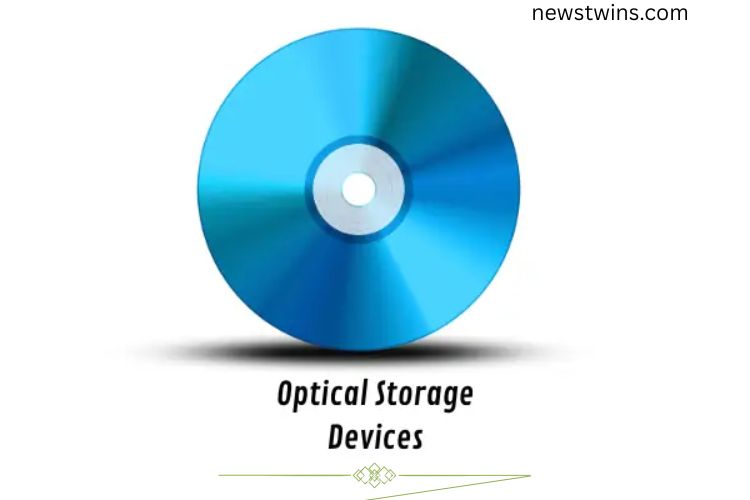
Optical storage devices, like CDs, DVDs, and Blu-ray discs, have been around for over four decades. They use laser technology to read and write data, making them a reliable, portable solution for storing music, movies, software, and other digital files. Even though modern alternatives like USB drives and cloud storage are more popular today, optical storage remains valuable for backups, media distribution, and long-term archiving. This guide will explore everything you need to know about optical storage devices, including types, examples, uses, advantages, and limitations.
Read More: Unlock the Secrets of Chain Printers: The Ultimate Beginner’s Guide to Effortless printing!
What Is Optical Storage?
Optical storage is a method of saving data using laser technology. Information is stored on discs, including CDs, DVDs, and Blu-ray discs, in tiny grooves called pits and lands. A laser reads these grooves and converts them into digital data, which your computer can display as files, music, videos, or software. Optical storage is portable, easy to use, and ideal for sharing or archiving data.
How Optical Storage Devices Work
Optical storage relies on light to read and write information. Here’s the process in simple steps:
- Insert a disc (CD, DVD, or Blu-ray) into the drive.
- A laser shines on the disc’s surface.
- The disc contains tiny pits and lands that represent digital data (0s and 1s).
- The laser reads these marks and converts them into digital signals.
- Your computer processes the signals and displays the data.
- For rewritable discs, the laser can also erase and rewrite information.
This precise laser-based process allows data to be stored safely and accessed repeatedly without degradation in most cases.
History of Optical Storage
The first widely used optical storage device was the Compact Disc (CD), introduced in 1982. Initially, CDs were designed for music, but they quickly became a popular medium for computer data storage. In 1995, DVDs appeared, offering higher capacity and suitability for movies and larger files. Blu-ray discs (BD) followed in 2006, enabling high-definition video storage.
While cloud storage and USB drives dominate today, optical media is still used for long-term backups, video distribution, and situations where internet access is limited.
Examples of Optical Storage Devices
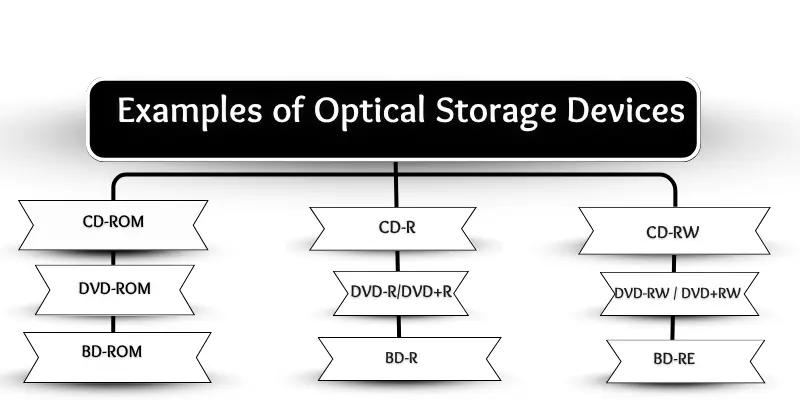
Optical storage devices vary in type and functionality, depending on whether they are read-only, recordable, or rewritable.
CD-ROM
Compact Disc Read-Only Memory stores data permanently. Users can only read information but cannot modify it. CD-ROMs are commonly used for software, music, and games.
CD-R
CD Recordable discs allow data to be written once. Once recorded, the data cannot be erased or modified. They are ideal for permanent backups of music, photos, or documents.
CD-RW
CD Rewritable discs can be written, erased, and reused multiple times. They work like a reusable notebook, making them perfect for temporary files or frequently updated data.
DVD-ROM
Digital Versatile Disc Read-Only Memory can only be read and is not writable. DVD-ROMs are often used to install software, games, or movies.
DVD-R / DVD+R
These discs allow a single write. After saving files, the data cannot be erased or altered. They are excellent for long-term storage of videos, music, or important documents.
DVD-RW / DVD+RW
These rewritable DVDs can be used multiple times. Files can be erased and replaced, making them flexible for backup, multimedia projects, and document storage.
BD-ROM
Blu-ray Disc Read-Only Memory uses a blue laser for reading data and is designed for high-definition video storage. Movie studios often distribute films on BD-ROMs.
BD-R
Blu-ray Disc Recordable can be written once and offers high capacity, ideal for storing HD videos, games, and large files.
BD-RE
Blu-ray Disc Rewritable allows multiple write and erase cycles. BD-RE is suitable for frequent backups and large multimedia files.
Uses of Optical Storage
Optical storage devices remain versatile tools for both personal and professional use. Common applications include:
- Storing Music: Audio CDs remain popular for playlists and collections.
- Watching Movies: DVDs and Blu-ray discs store full-length films.
- Backing Up Data: Critical files can be archived safely.
- Installing Software: Some programs still use CDs and DVDs.
- Saving Photos: Disc storage provides a long-term option for images.
- Sharing Videos: Home videos can be distributed easily.
- Gaming: Many video games are distributed on discs.
- Educational Content: Schools use discs for teaching materials.
- Document Archiving: Important reports and files can be stored offline.
Advantages and Disadvantages
Benefits
- Portable and lightweight
- Affordable and widely available
- Long-lasting if handled properly
- Resistant to most viruses
- Does not require electricity to store data
- Compatible with multiple devices
- Useful for backups and archiving
Drawbacks
- Slower than USB drives or SSDs
- Easily scratched or damaged
- Limited storage compared to modern drives
- Requires a disc drive, which is less common in new laptops
- Some discs are single-use only
- Writing and rewriting can take longer
Frequently Asked Questions:
What are optical storage devices?
Optical storage devices are data storage media, like CDs, DVDs, and Blu-ray discs, that use laser technology to read and write information. They store music, videos, software, and other files securely.
How do optical storage devices work?
These devices use a laser to read tiny pits and lands on a disc surface. The laser converts these patterns into digital data that your computer can display as files, videos, or music. Rewritable discs can also be erased and rewritten.
What are the key advantages of optical storage?
They are portable, affordable, long-lasting, virus-resistant, and excellent for backups and sharing data without requiring electricity.
What are the limitations of optical storage devices?
They have slower read/write speeds compared to modern drives, limited storage capacity, are prone to scratches, and require a disc drive, which is less common in newer laptops.
Can I reuse an optical disc?
Yes, only rewritable discs like CD-RW, DVD-RW, and BD-RE can be erased and reused multiple times. Single-use discs like CD-R, DVD-R, or BD-R cannot be rewritten.
Are optical storage devices still relevant today?
Yes. While USB drives and cloud storage are more popular, optical storage is still useful for media distribution, long-term backups, archiving, and offline data sharing.
How long can data last on optical storage?
With proper care, data on CDs, DVDs, and Blu-ray discs can last anywhere from 10 to 50 years, making them reliable for archiving important files.
Conclusion
Optical storage devices remain a cornerstone of digital data management, even in today’s era of cloud storage and USB drives. From CDs and DVDs to Blu-ray discs, these devices provide a reliable, portable, and cost-effective way to store, share, and back up music, videos, software, and important files. Understanding their types, functions, and limitations helps you choose the right medium for your needs. While they may not match modern drives in speed or capacity, their long-term durability and ease of use make them an excellent choice for archiving, media distribution, and offline storage. By mastering optical storage, you ensure your data is secure, accessible, and organized—ready whenever you need it.