
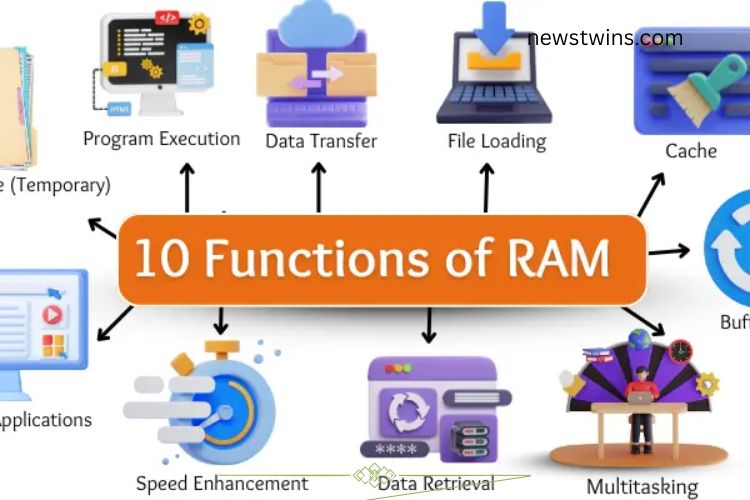
Have you ever noticed that your computer sometimes runs lightning fast and other times seems sluggish? A big part of this performance depends on RAM (Random Access Memory). RAM is a critical component that temporarily stores data, helping your computer work efficiently. Understanding its functions can give you insight into why your system performs the way it does and how to optimize it. Let’s explore the 10 essential functions of RAM and see how it keeps your digital world running smoothly.
Read More: Unlocking the Power of Line Printers: Essential Uses, Key Types & Surprising Limitations
Data Storage (Temporary)
RAM stores information temporarily while the computer is powered on. When you open a program or file, RAM holds the data so your processor can access it quickly. Once you turn off your device, this data is erased. This temporary storage ensures that your system can access active files almost instantly, rather than waiting to read them from slower storage drives.
Program Execution
Every program you open is loaded into RAM, which allows it to run smoothly. RAM provides the processor with quick access to the program’s data, enabling fast startup and seamless performance. Without sufficient RAM, programs open slowly, freeze, or even crash under heavy workloads. In short, RAM powers the smooth execution of all your software.

Data Transfer
RAM acts as a high-speed bridge between the processor and storage devices. It moves data efficiently, ensuring that tasks progress without interruption. For example, transferring files from your hard drive to the CPU happens almost instantly thanks to RAM. This fast data movement prevents bottlenecks and keeps your computer responsive.
File Loading
Opening files becomes effortless with RAM. By temporarily holding files for the processor, it reduces waiting times significantly. Whether it’s a document, video, or image, RAM ensures your files are ready in seconds. Quick file loading is crucial for productivity and enhances user experience.


Caching
RAM also functions as a cache, storing frequently used data for immediate access. Instead of retrieving information from slower storage each time, your system can access it directly from RAM. For instance, reopening a program is much faster because the cached data is already available. Effective caching improves speed and workflow efficiency.
Multitasking Support
One of RAM’s most vital roles is enabling multitasking. It provides each running application with enough memory to function simultaneously, allowing you to switch between tasks seamlessly. For example, you can edit a document, stream music, and browse the web at the same time. Sufficient RAM ensures smooth multitasking without lag.
Buffering
Buffering relies heavily on RAM. It temporarily stores data before sending it to the processor or output devices at the correct speed. This is especially useful when streaming videos, playing games, or listening to music. RAM keeps small portions of data ready, preventing pauses and ensuring a smooth, uninterrupted experience.
Data Retrieval
RAM enables rapid data retrieval for the processor. When you switch back to a program or reopen a file, RAM instantly provides the needed information without fetching it from slower storage. Fast data retrieval minimizes downtime, keeps workflows smooth, and enhances overall efficiency.



Speed Enhancement
RAM directly affects the speed and responsiveness of your computer. It gives the processor quick access to the information required for tasks, reducing wait times and improving performance. Programs open faster, games run smoother, and heavy software handles tasks efficiently. The more RAM you have, the better your system can maintain peak performance.
Running Applications
Applications rely on RAM for immediate processing. From web browsers and video editors to games, RAM ensures these programs run without interruptions. By holding essential data ready for the CPU, RAM allows applications to respond quickly, creating a seamless user experience. Adequate RAM prevents slowdowns and makes everyday computing faster and more enjoyable.
Frequently Asked Questions:
What exactly is RAM and why is it important?
RAM (Random Access Memory) is temporary memory that stores data and programs your computer is actively using. It’s crucial because it allows your system to access information quickly, keeping applications fast and responsive.
How does RAM affect my computer’s speed?
More RAM enables your processor to access data without delays. This means programs open faster, multitasking is smoother, and heavy applications like games or video editors run efficiently.
Can I run multiple applications at once with RAM?
Yes! RAM provides the memory space needed for multitasking. The more RAM your system has, the more applications it can handle simultaneously without slowing down.
Does RAM store permanent data?
No. RAM is temporary memory. When you turn off your computer, all data stored in RAM is erased. Permanent storage requires hard drives or SSDs.
How does RAM help with gaming and video editing?
RAM allows games and editing software to load assets, textures, and temporary files quickly. Sufficient RAM ensures smoother gameplay and faster video rendering without lags.
What is caching in RAM?
Caching is when RAM stores frequently used data for quick access, so your system doesn’t need to retrieve it from slower storage every time. This dramatically improves speed and efficiency.
How do I know if my computer needs more RAM?
Signs include slow program loading, frequent freezing, or lag during multitasking. Checking your system’s RAM usage in the task manager can also reveal if an upgrade is needed.
Conclusion
RAM is the powerhouse that keeps your computer fast, efficient, and responsive. By temporarily storing data, enabling multitasking, supporting caching, and accelerating file access, RAM ensures your programs and applications run smoothly. Whether you’re gaming, editing videos, or working on multiple tasks, sufficient RAM directly impacts your device’s performance. Understanding its essential functions empowers you to optimize your system, prevent slowdowns, and unlock the full potential of your computer. Investing in quality RAM isn’t just an upgrade—it’s a gateway to faster, smoother, and more productive computing.